How the 5 Methods Compare
Know Exactly Where You Stand
Check Eligibility Online →8171 Web Portal 2026: Check BISP Eligibility, Payment Status & Registration
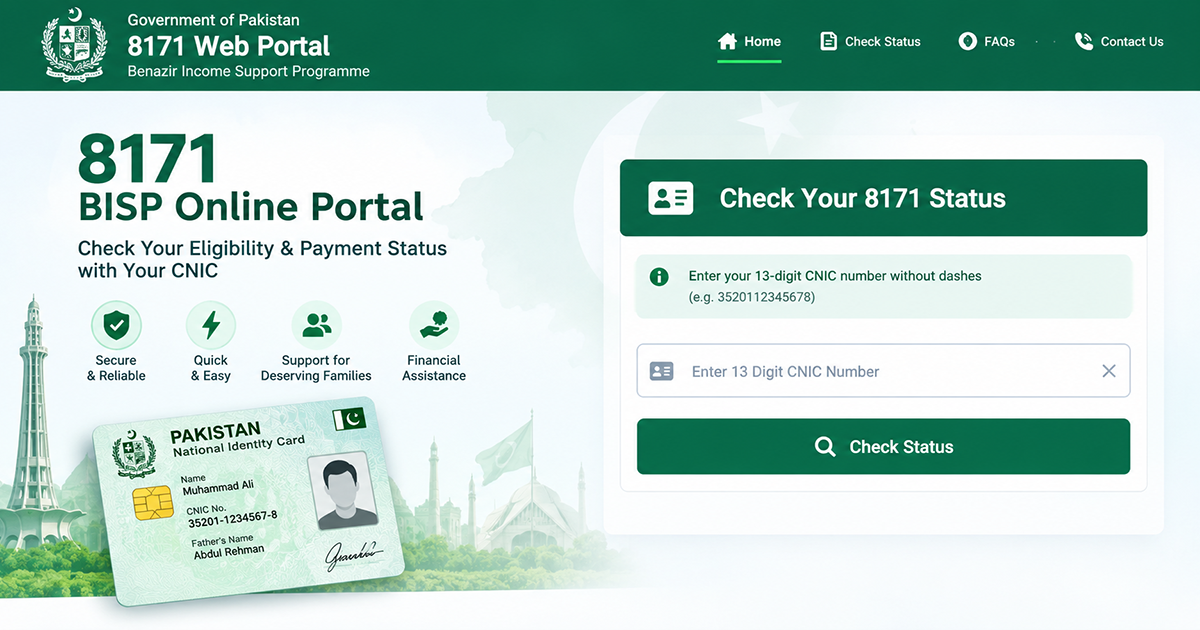
If you want to check your BISP status, register as a new applicant, or track a payment, the 8171 web portal is the only official place to do it. This guide walks you through every step — no outdated instructions, no confusing jargon — so you can check your eligibility or complete your registration in just a few minutes.
By the end of this page, you’ll know exactly how to:
- Check your eligibility using your CNIC
- Register on the 8171 portal for the first time
- Track your payment status
- Fix the most common errors people run into
What Is the 8171 Web Portal?
The 8171 web portal is the official online system run by the Benazir Income Support Programme (BISP) — also known as the Ehsaas program — for checking eligibility, registering new applicants, and monitoring payments. It’s built around a simple idea: enter your CNIC, and the system tells you where you stand.
The bisp 8171 web portal pulls directly from BISP’s National Socio-Economic Registry (NSER), so the result you see online is the same one BISP staff would see internally.
Heading into the second half of 2026, BISP has been moving beneficiaries onto a digital wallet system, with nationwide digital wallet payments becoming the standard method of disbursement rather than manual cash collection. If you’re already registered, this mostly affects how your money reaches you — it doesn’t change how you check your status. You’ll still use the same CNIC check on the 8171 web portal or the SMS method described below.
Who Can Use the Portal?
The portal serves two main groups, and each uses it a little differently.
Existing Beneficiaries
If you’re already receiving support, you’ll mainly use the portal to:
- Confirm your quarterly payment has been released
- Check whether your wallet or account needs updating
- Resolve status errors before visiting a payment center
New Applicants
If you haven’t registered yet, the portal lets you:
- Check whether your household is likely eligible before you apply
- Complete your registration entirely online
- Verify your mobile number and receive confirmation by SMS
What You Need Before Starting
Before you open the portal, have these ready:
- Your valid 13-digit CNIC (Computerized National Identity Card)
- A mobile number registered in your own name — this matters for SMS verification
- Internet access, or a basic mobile phone if you plan to use the SMS method instead
How to Check Your Eligibility (Step-by-Step)
There are two official ways to check your eligibility: through the website, or by SMS if your internet connection is unreliable.
Method 1 — Web Portal Check
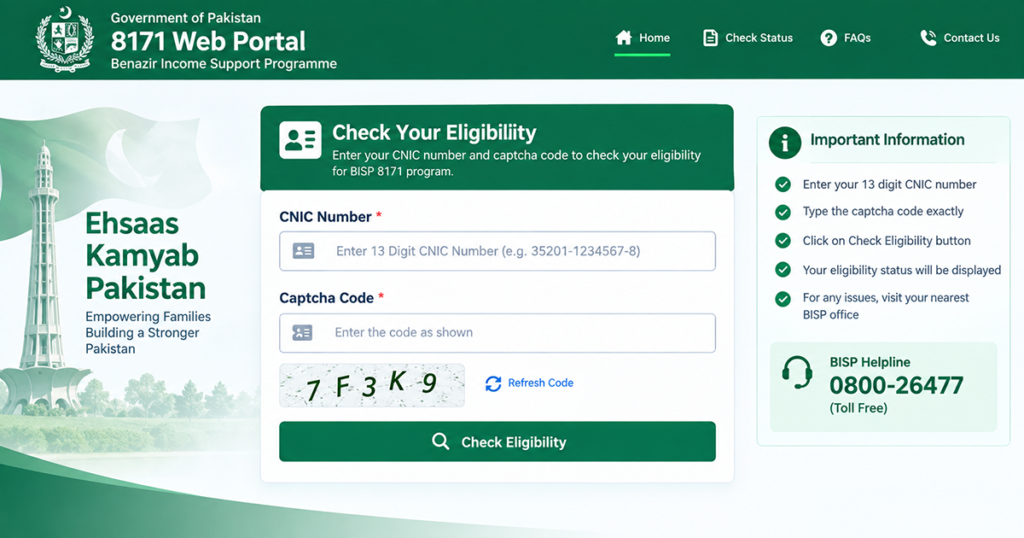
- Open the official portal at 8171.bisp.gov.pk on your phone or computer.
- Enter your 13-digit CNIC number, without dashes or spaces.
- Complete the captcha code shown on screen.
- Click Check Status or Check Eligibility.
- Read your result: it will show as eligible, not eligible, under verification, or requiring a survey update.
If your result says “not eligible” or “CNIC not found,” don’t panic — this is one of the most common outcomes, and there’s usually a simple fix. fix a CNIC not found error
For the full walkthrough with screenshots, see our dedicated guide on how to check your eligibility by CNIC.
Method 2 — SMS Check (8171)
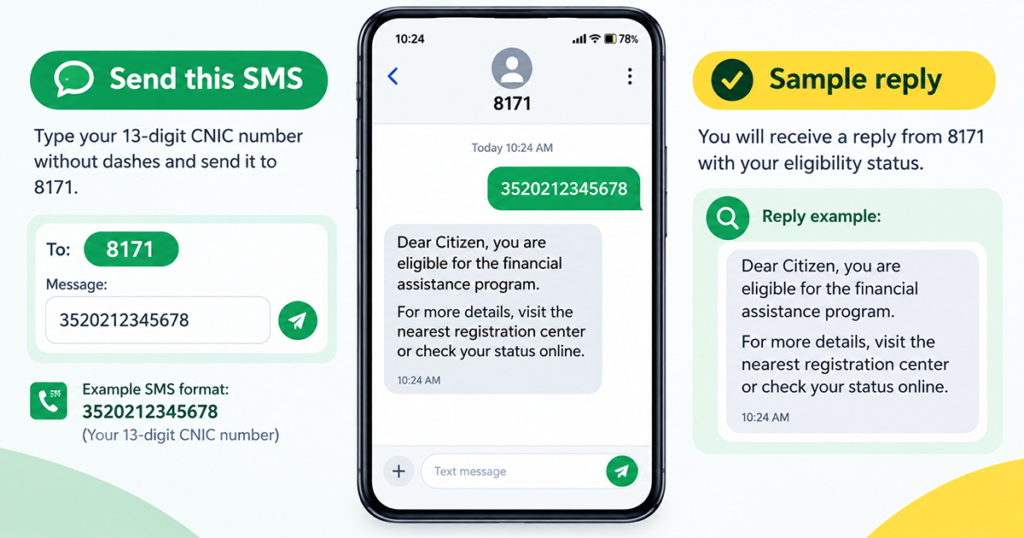
If your internet is slow or unavailable, you can check the same information by SMS — and it works on basic keypad phones too.
- Open your phone’s messaging app.
- Type your 13-digit CNIC number, with no dashes or spaces.
- Send it to 8171.
- Wait 5–10 minutes for a reply confirming your status.
This service works on Jazz, Zong, Telenor, and Ufone, and it’s completely free. For the exact message formats and what each reply means, see our full guide on how to send your CNIC via SMS.
Important: 8171 is the only official number for this service. Never trust messages or calls claiming to be from BISP that come from any other number, and never pay a fee to check your status or collect a payment.
How to Register on the 8171 Portal
If you haven’t applied before, registration is done directly through the portal:
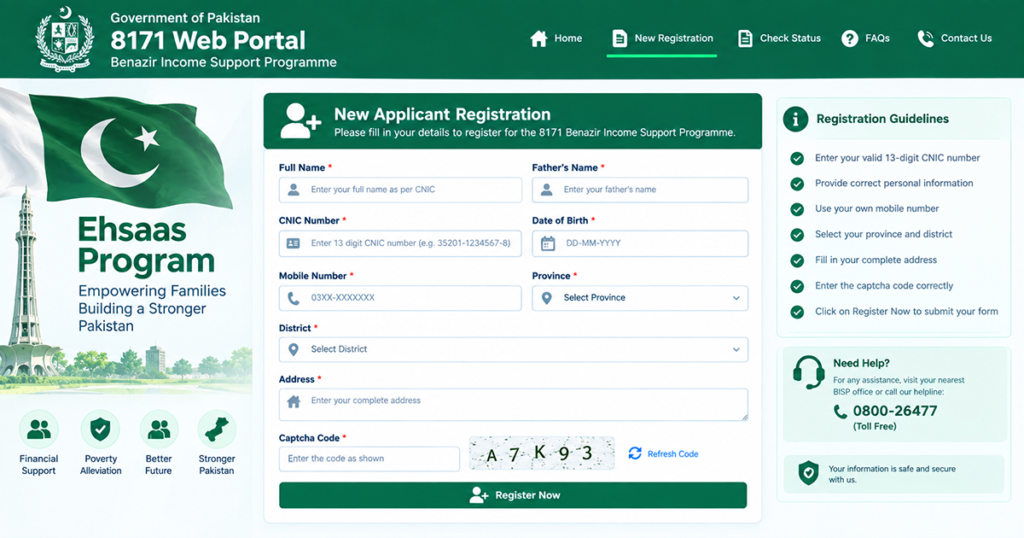
- Go to the 8171 web portal and select the New Registration option.
- Enter your CNIC number exactly as it appears on your card.
- Provide your mobile number — it must be registered in your own name.
- Submit any additional household details the form requests.
- You’ll receive a verification code by SMS; enter it to confirm your mobile number.
- Once submitted, your application enters the review queue against the NSER database.
Registration through the portal is free. If a “facilitator” asks for payment to register you, that is not an official BISP process — report it through the helpline.
Checking Your Payment Status
Once you’re registered and marked eligible, you can track each quarterly payment the same way you checked your eligibility — by CNIC on the portal or by SMS.
A good rule of thumb: check every two to three days rather than daily, since payment phases roll out by district and status doesn’t usually change hour to hour. Wait for the official SMS confirming your payment is ready before traveling to a payment center — this saves you an unnecessary trip if your district’s phase hasn’t started yet.
For a complete breakdown of what each payment status means and what to do next, see our guide on how to track your payment status.
Common Errors and How to Fix Them
A few issues come up often enough that it’s worth knowing about them before you start:
- “CNIC not found” — usually means your CNIC hasn’t been matched in the NSER yet, or there’s a data entry issue. This doesn’t always mean you’re ineligible.
- Portal downtime or slow loading — most common during peak hours right after a new payment cycle is announced. The SMS method pulls from the same database and works when the portal is overloaded.
- Incorrect CNIC entry — double-check for exactly 13 digits with no dashes, spaces, or extra characters before submitting.
For step-by-step fixes to each of these, see our full guide on how to fix a CNIC not found error.
BISP Gov PK Login: How to Sign In on the 8171 Web Portal
Most people searching for a BISP gov pk login want one thing: a way to open their own record on the 8171 web portal and see exactly where their application stands. It helps to know that BISP does not use a traditional username-and-password account. The BISP gov pk login is really a CNIC-based sign-in — your 13-digit identity card number is the username, and the captcha on screen takes the place of a password.
To complete a BISP gov pk login, open the portal, type your CNIC without dashes or spaces, solve the captcha, and press the check button. The screen that loads is your record: eligibility, survey status, and any instalment that has been released. If nothing loads, the site is usually under heavy load rather than broken — wait a few minutes and try the same BISP gov pk login again, or fall back to the free SMS method described above.
Two points are worth repeating. First, a real BISP gov pk login will never ask you for a bank PIN, an OTP belonging to someone else, or a processing fee. Second, any page that asks you to create a password for a BISP gov pk login is not run by BISP. The genuine 8171 web portal only ever asks for a CNIC and a captcha.
8171 Official Website: How to Recognise the Real Portal
Because so many copycat pages exist, knowing the 8171 official website matters as much as knowing how to use it. The 8171 official website sits on the government’s own .gov.pk domain, and the wider programme is documented on the main BISP site. That domain suffix is the fastest way to confirm you are on the 8171 official website and not a lookalike built to harvest CNIC numbers.
A genuine 8171 official website will never ask for a fee, a mobile wallet PIN, or a photo of your bank card. It will not promise to approve your application faster in exchange for money, and it will not ask you to install an APK file to check your status. If a page does any of those things, close it — it is not the 8171 official website, however closely the logo and colours have been copied.
If you are unsure, use the SMS route instead: sending your CNIC to 8171 reaches the same database as the 8171 official website with no browsing risk at all. And when you do use a browser, type the address yourself rather than following a link from a WhatsApp forward or a sponsored ad.
BISP 8171 Web Portal: Payments, Amounts and Schedule
The BISP 8171 web portal is where each quarterly Benazir Kafalat instalment is confirmed before it is paid out. Payments roll out in phases by district, so two households in different provinces can see different results on the same day on the BISP 8171 web portal. That is normal timing, not an error in your record.
When a phase opens, the BISP 8171 web portal shows the released amount against your CNIC along with the collection method assigned to you. Since the move to digital wallets, most beneficiaries now see a wallet transfer rather than a camp collection point. Your status on the BISP 8171 web portal changes once the instalment is actually released, not when a new phase is announced in the news.
Alongside Kafalat, education stipends under Benazir Taleemi Wazaif are tied to school attendance and are confirmed through the same CNIC check. If your household record shows an instalment you never received, do not re-apply — take your CNIC to the nearest BISP Tehsil office and ask staff to trace the payment against the record shown on the BISP 8171 web portal.
What the 8171 Web Portal 2026 Update Changed
If you last used the service a year or two ago, several things about the 8171 web portal 2026 experience are different. The biggest change is disbursement: the 8171 web portal 2026 flow assumes a digital wallet by default, and the status screen now tells you which wallet or account an instalment has been pushed to.
The second change is verification. The 8171 web portal 2026 checks lean more heavily on the mobile number registered against your CNIC, so a SIM registered in a relative’s name is now one of the most common reasons a check fails. Update the number into your own name before you rely on the portal for anything time-sensitive.
The third is speed. Because the 8171 web portal 2026 system reads the same NSER record that BISP staff see, a survey update made at a Tehsil office usually appears online within days rather than weeks. If your result still looks stale after a fortnight, that is the point at which a follow-up office visit is worth making. Everything else — the CNIC field, the captcha and the free SMS fallback — works exactly as it did before the 8171 web portal 2026 refresh.
Conclusion
The 8171 web portal covers three core actions: checking your eligibility, registering as a new applicant, and tracking your payments. Whether you use the website or the SMS method, both pull from the same official BISP database — so pick whichever works best with your internet connection.
For the next steps, check out our detailed guides on how to check your eligibility by CNIC, track your payment status, and fix a CNIC not found error.
Official sources: eligibility checks and registration on the 8171 web portal are handled only at 8171.bisp.gov.pk, and payment or digital wallet announcements are published on the official BISP website.