8171 CNIC Check: Verify Your BISP Eligibility Online (2026)
Free to check
No account or login needed
Works by SMS too
If you want to know whether you qualify for BISP financial assistance, the fastest way to find out is by running an 8171 CNIC check. All it takes is your 13-digit CNIC number and a working internet connection — no visit to an office, no waiting in line. This guide walks you through the exact steps for a BISP CNIC check online, explains what each possible result means, and points you to alternatives if your CNIC doesn’t return a match.
What Is the 8171 CNIC Check?
The 8171 CNIC check is the online eligibility verification system run through the 8171 web portal, which connects directly to BISP’s (Benazir Income Support Programme) database. Instead of manually surveying households, the system lets you check eligibility by CNIC in seconds by matching your national identity number against the National Socio-Economic Registry (NSER) records.
This method replaced the older process of visiting a Tehsil office or waiting for a survey team, and it’s now the standard way most applicants confirm their status for programs like the Benazir Kafaalat Program and other BISP disbursements.
Behind the scenes, every CNIC is linked to a household record collected during an NSER survey. That record includes income indicators, assets, family size, and other factors used to calculate a Proxy Means Test (PMT) score. When you run a BISP CNIC check online, the portal isn’t generating a new decision on the spot — it’s simply displaying the current status attached to your household’s existing record. That’s an important distinction, because it explains why two people in the same house can sometimes see different information, and why a result can change after a re-survey without you doing anything differently online.
What You Need Before Starting
Before you get started, make sure you have the following ready:
- Your original CNIC number (13 digits, no dashes needed on most forms)
- A stable internet connection (mobile data works fine)
- A smartphone or computer with a browser
- The mobile number registered against your CNIC, in case an SMS verification step is required
- Patience for a few seconds of server load time, especially during high-traffic periods
Having your CNIC and registered mobile number on hand avoids the most common cause of failed attempts — mistyped digits.
Step-by-Step: How to Check by CNIC
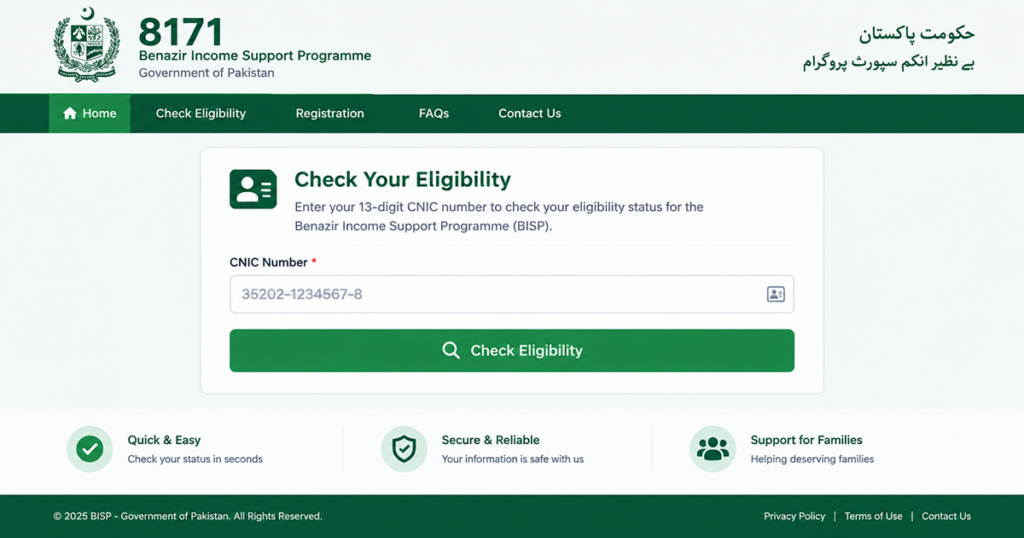
Follow these steps to complete the 8171 CNIC check:
- Open the official 8171 web portal on your browser. Avoid third-party apps or unofficial links that ask for extra permissions.
- Locate the CNIC entry field on the homepage. It’s usually labeled “Enter CNIC” or similar.
- Type your 13-digit CNIC number carefully, without spaces or dashes, exactly as printed on your card.
- Complete the verification step if prompted — this may be a simple captcha or an OTP sent to your registered mobile number.
- Submit the form by tapping the check or verify button.
- Wait for the result screen to load. This usually takes just a few seconds.
- Read your eligibility status carefully — it will show as Eligible, Not Eligible, or Pending, along with any reference or PMT-related details.
If the page fails to load or hangs after submission, avoid repeatedly clicking submit — this can trigger unnecessary duplicate requests. Refresh the page once, confirm your CNIC digits, and try again. Most delays during this process come from server load rather than an issue with your specific record.
How PMT Scores Affect Your Eligibility
Understanding Your Result
Once your 8171 CNIC check completes, you’ll see one of three outcomes. Here’s what each one actually means.
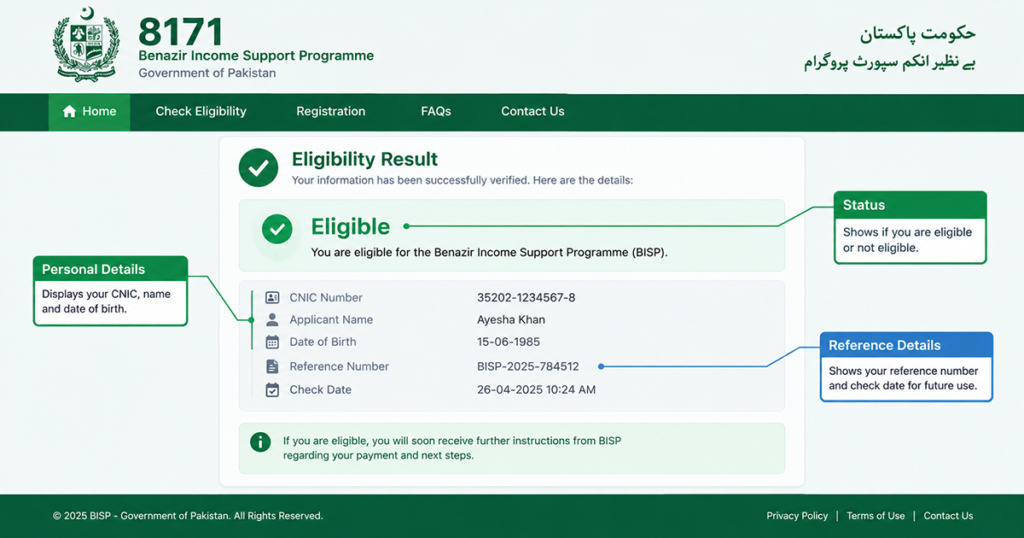
Eligible
If your result shows “Eligible,” it means your household’s Proxy Means Test (PMT) score falls within the threshold BISP uses to qualify families for support. This doesn’t guarantee immediate payment — it confirms you’re in the pool of qualifying households. The next step is typically visiting a designated payment point or waiting for your disbursement cycle to open, depending on which program (like Kafaalat) you’re linked to.
It’s worth noting that “Eligible” is a status, not a transaction. Some applicants assume a payment will land automatically once they see this word on screen, then get confused when nothing arrives right away. In practice, disbursement rounds are scheduled centrally, and being marked eligible simply places your household in line for the next applicable cycle, pending any final field verification.
Not Eligible
A “Not Eligible” result means your recorded PMT score is above the cutoff, or your household data doesn’t currently meet BISP’s criteria. This can happen even if your financial situation has changed since the last survey, because the 8171 CNIC check relies on the most recent NSER data on file. If you believe this is inaccurate, a re-survey or update request at your nearest Tehsil office is usually the next step.
There are a few common reasons a household ends up marked “Not Eligible” even when the family genuinely needs support: outdated income or asset information, a change in household composition that hasn’t been recorded, or a data-entry mismatch during the original survey. None of these are permanent — they’re just gaps in the record that a re-survey request can correct.
Pending
“Pending” typically means your CNIC is in the system, but your record is still being processed, awaiting a fresh survey, or caught in a data verification queue. It’s not a rejection — it simply means no final decision has been recorded yet. Checking back after a few weeks is generally advisable.
A “Pending” status can also appear right after a mass re-survey drive in your area, when large batches of records are being reviewed at once. If your status stays pending for an unusually long time — more than a couple of months — it’s reasonable to follow up in person rather than continuing to rely solely on the online 8171 CNIC check.
CNIC Not Found?
Sometimes the 8171 CNIC check returns no record at all. This usually means your household was never surveyed under NSER, or your CNIC details weren’t updated after a renewal. If this happens to you, our dedicated guide walks through exactly what to do next.
CNIC Not Found in 8171 — What To Do
Alternative: SMS Check
Don’t have reliable internet access? You can also check eligibility by CNIC using a simple SMS method — just text your CNIC number to the designated BISP short code from your registered mobile number. It’s slower than the web portal but works well in areas with weak connectivity.
Common 8171 CNIC Check Errors and How to Fix Them
Most problems people run into during an 8171 CNIC check come down to four recurring issues. Working through them in order usually solves the problem without a trip to a BISP office.
“Invalid CNIC” or format errors
The portal expects all 13 digits with no dashes, no spaces and no letters. If you paste your number from a saved note or a message, hidden characters can travel with it. Type the digits manually instead, then read them back against the card itself — a single transposed digit is the most common reason an 8171 CNIC check fails outright.
The 8171 web portal will not load
Traffic climbs sharply in the first days of a new disbursement cycle, and the portal can slow down or time out. Try again during off-peak hours, and avoid refreshing repeatedly — that only adds to the queue. Clearing your browser cache, or switching between mobile data and Wi-Fi, resolves a surprising share of failures before you start your 8171 CNIC check.
The verification code never arrives
The code is sent to the mobile number registered against your CNIC, which is not always the phone in your hand. If that SIM is inactive or registered to somebody else, the code will never reach you and the check cannot be completed. Updating the registered number at a BISP registration centre is the only dependable fix.
The result keeps showing “Pending”
A pending status usually means your record is mid-review rather than stuck. Repeating the 8171 CNIC check every day will not move it along. Wait two to three weeks and try again; if nothing has changed after a full month, take your CNIC to the nearest tehsil office and ask for the case to be reviewed directly.
8171 CNIC Check Online vs. SMS to 8171
Both routes read from the same BISP database, so the underlying answer is identical. What differs is speed, detail, and what you need to have with you.
| 8171 CNIC check (web portal) | SMS to 8171 | |
|---|---|---|
| Internet needed | Yes | No |
| Detail returned | Status, reference details and next steps | Short status reply only |
| Typical wait | Seconds | Minutes to hours at peak |
| Device | Any phone or computer with a browser | Any handset, including basic phones |
| Best for | A full picture of your case | A quick status ping with no data connection |
In short: use the online 8171 CNIC check when you want the whole picture on one screen, and use SMS when you have no data connection or a basic handset. If the two ever disagree, trust the portal — a BISP CNIC check online reads the live record, while an SMS reply can be delayed in the queue.
What to Do After a “Not Eligible” Result
A “Not Eligible” result is not permanent. It reflects the PMT score attached to your household from the most recent NSER survey, and that score can be recalculated when your circumstances change.
Start by ruling out a simple mistake: run the 8171 CNIC check once more, slowly, and confirm you used the CNIC the household is actually registered under. Families often check with a son’s or daughter’s number when the registration sits with the head of household, and the two records return different answers.
If the result holds, request a fresh survey at a BISP tehsil office or an NSER registration desk. Take your original CNIC, your household’s B-Form if you have children under 18, and anything that documents a change in income, employment or family size. The survey team re-scores the household, and once the new score is entered you can check eligibility by CNIC again to see whether the status has moved.
Expect that update to take several weeks. Until the database is refreshed, an 8171 CNIC check will keep returning the old result no matter how often you run it, so there is nothing to gain from checking daily.
Is the 8171 CNIC Check Free?
Yes. Checking your status on the official 8171 web portal costs nothing beyond your normal data charges, and the SMS route is charged at your operator’s standard message rate. BISP does not charge a fee to verify eligibility, and no legitimate agent, shopkeeper or “helper” is authorised to take money for running an 8171 CNIC check on your behalf.
This matters because the fee itself is the giveaway. If someone asks for payment to check your status, register you, or “speed up” a pending case, you are almost certainly dealing with a scam. The same applies to messages promising approval in exchange for a processing charge, an easypaisa transfer, or your CNIC photographed and sent to a private number. Share your CNIC only on the official portal or at a BISP office.
How Often Should You Check Your Status?
Once every two to three weeks is enough for most households. The BISP database is updated in batches rather than continuously, so a check today and a check an hour later will almost always return the same answer. Running a BISP CNIC check online several times a day adds load to the portal during peak periods without giving you any new information.
The moments genuinely worth checking are these: after a new disbursement cycle is announced, roughly three to four weeks after a re-survey has been recorded, and whenever you receive an official SMS from 8171 asking you to confirm something. Outside those windows, an 8171 CNIC check is best treated as a monthly habit rather than a daily one.
Conclusion
Running an 8171 CNIC check is the quickest way to find out where you stand with BISP — and now you know exactly what each result means, not just how to get one. Whether your screen shows Eligible, Not Eligible, or Pending, that status reflects a specific point in your household’s record, not a fixed, unchangeable verdict — and each outcome has a clear next step you can take. If your CNIC doesn’t return a match, or you’d rather use SMS instead of the web portal, the linked guides above cover both situations in detail. Ready to check your status? Head to the 8171 web portal and enter your CNIC now.